If necessary, use your TV’s
remote control to select the external source on your TV to which your TV Box is connected (AV1, HDMI1, EXT1, etc.)
Use the arrow keys
to navigate through the menus and
to confirm.
Holding down a direction key allows you to browse horizontally or vertically more quickly.
Return to the main menu at any time
Return to the previous screen
Pausing or resuming a programme
Skip forwards or backwards through a programme (press several times to increase the speed or change the day in the TV guide)
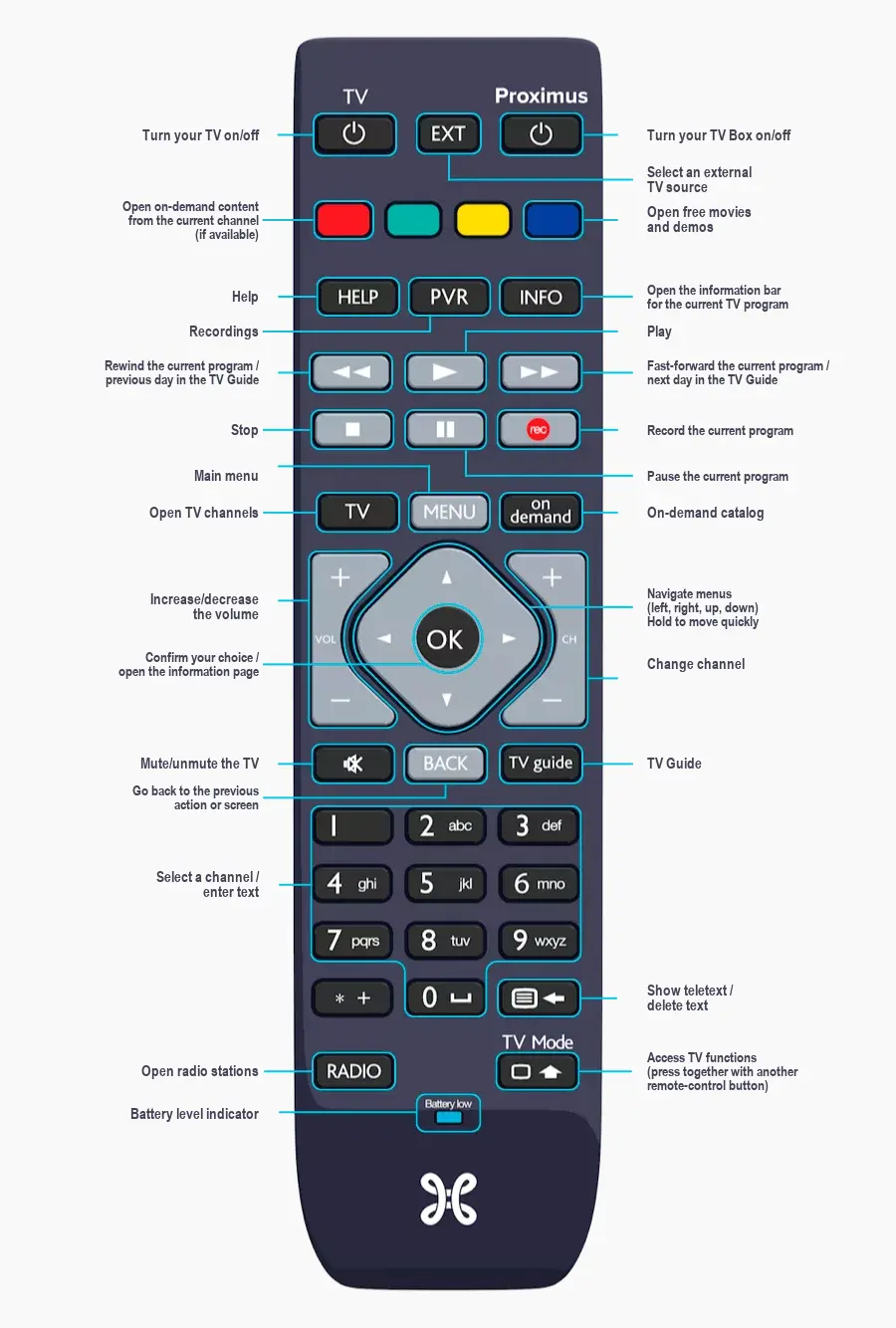
The buttons on the remote control
Use a single remote control for the TV and the TV Box
Control your TV and your TV Box with the Proximus remote control.
This means you’ll be able to:
Turn on your TV or turn it off
Select an external source on your TV
Adjusting the volume on your TV
Mute your TV
Do you have a Samsung TV?
Look no further – the remote is already configured!
Do you own a Loewe TV?
1. Turn on your TV.
2. Press the following buttons simultaneously
and
at the same time until the
Turn on.
3. Enter the code 1884
.
4. Press the
to switch off the TV.
Test your new functions, for example by pressing the
. If the TV does not respond, try the operation again.
Do you have a TV from a different brand?
Follow the next steps:
1. Turn on your TV.
2. Press the following buttons simultaneously
and
at the same time until the
Turn on.
3. Hold down the
until the TV is off (this may take several minutes).
4. Once the TV is off, release the button immediately. This means the code has been found.
5. Exit by pressing
.
Control your remote however you like
From now on, you won’t need to point your remote control at the TV Box. Use a radio frequency connection! This is handy if you want to put it in a cupboard.
Use the
to select the external source to which the TV Box is connected on your TV, or do this by pressing the AV, Aux, EXT or HDMI button on your TV remote control.